Type once and turn plain text into hundreds of copy-and-paste styles for a bio, caption, chat, or game
name. The generator runs in your browser, so nothing needs to be installed and no account is required.
𝐒𝐭𝐲𝐥𝐢𝐬𝐡Bold
𝒮𝓉𝓎𝓁𝒾𝓈𝒽Script
𝔖𝔱𝔶𝔩𝔦𝔰𝔥Gothic
𝕊𝕥𝕪𝕝𝕚𝕤𝕙Outline
Style group
150 styles ready to copy
Hearts
♡Stylish Font♡
Solid Hearts
❤Stylish Font❤
Stars
★Stylish Font★
Open Stars
☆Stylish Font☆
Tildes
~Stylish Font~
Dot Ends
•Stylish Font•
Skulls
☠Stylish Font☠
Blades
⚔Stylish Font⚔
Crosshair
⌖Stylish Font⌖
Katakana Smile
ツStylish Fontツ
Lightning
⚡Stylish Font⚡
Royal Frame
꧁༺Stylish Font༻꧂
Sparkles
✧・゚Stylish Font・゚✧
Star Line
⋆Stylish Font⋆
Moon Phase
☽Stylish Font☾
Flowers
❁Stylish Font❁
Bold + Hearts
♡𝐒𝐭𝐲𝐥𝐢𝐬𝐡 𝐅𝐨𝐧𝐭♡
Script + Hearts
♡𝒮𝓉𝓎𝓁𝒾𝓈𝒽 ℱℴ𝓃𝓉♡
Gothic + Hearts
♡𝔖𝔱𝔶𝔩𝔦𝔰𝔥 𝔉𝔬𝔫𝔱♡
Small Caps + HeartsWidest device support
♡ꜱᴛʏʟɪꜱʜ ꜰᴏɴᴛ♡
Outline + Hearts
♡𝕊𝕥𝕪𝕝𝕚𝕤𝕙 𝔽𝕠𝕟𝕥♡
Bold + Solid Hearts
❤𝐒𝐭𝐲𝐥𝐢𝐬𝐡 𝐅𝐨𝐧𝐭❤
Script + Solid Hearts
❤𝒮𝓉𝓎𝓁𝒾𝓈𝒽 ℱℴ𝓃𝓉❤
Gothic + Solid Hearts
❤𝔖𝔱𝔶𝔩𝔦𝔰𝔥 𝔉𝔬𝔫𝔱❤
Small Caps + Solid HeartsWidest device support
❤ꜱᴛʏʟɪꜱʜ ꜰᴏɴᴛ❤
Outline + Solid Hearts
❤𝕊𝕥𝕪𝕝𝕚𝕤𝕙 𝔽𝕠𝕟𝕥❤
Bold + Stars
★𝐒𝐭𝐲𝐥𝐢𝐬𝐡 𝐅𝐨𝐧𝐭★
Script + Stars
★𝒮𝓉𝓎𝓁𝒾𝓈𝒽 ℱℴ𝓃𝓉★
Gothic + Stars
★𝔖𝔱𝔶𝔩𝔦𝔰𝔥 𝔉𝔬𝔫𝔱★
Small Caps + StarsWidest device support
★ꜱᴛʏʟɪꜱʜ ꜰᴏɴᴛ★
No specimen matches that filter.
Saved styles
01 The toolkit
Why does each tool lead with different styles?
Every tool runs the same engine, leads with styles chosen for its subject, and tells you the
character limit and which field will accept styled text.
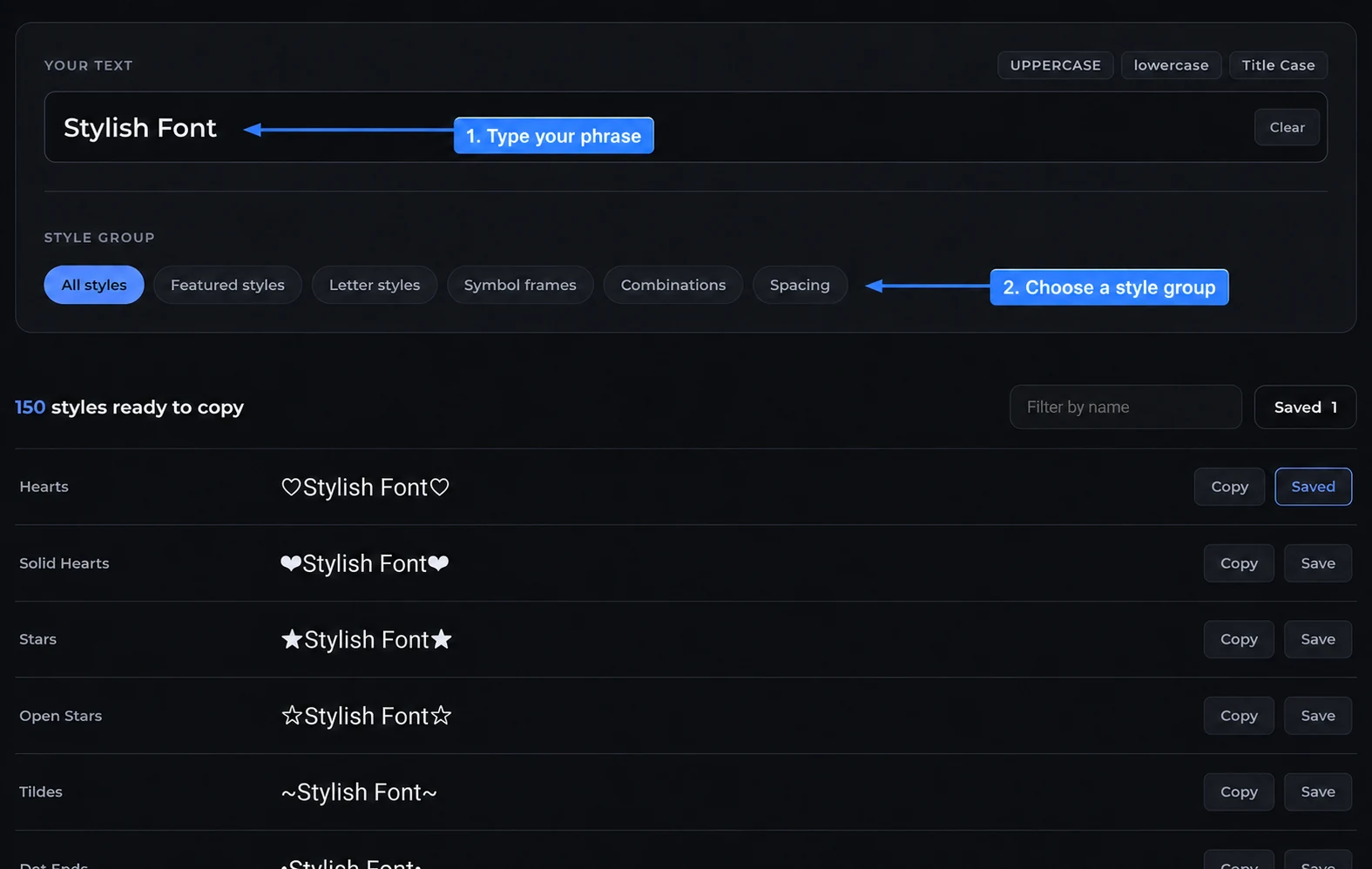
The Stylish Font Generator follows a simple four-step process. Type your phrase, narrow the styles,
compare the results, and then copy the version that fits your profile, caption, chat, or game name.
Step 1: Type the text you want to style
Start in the Your text field at the top of the generator. The tool opens with “Stylish Font” as a
sample, but you can replace it with a username, bio line, caption, or game name.
As you type, the previews update in your browser. Therefore, you can check the exact spelling,
spaces, punctuation, and capitalization before you copy anything.
Step 2: Choose a style group
Once the phrase is ready, use the style group buttons to narrow the list. Each group solves a
different design need, so the results are easier to scan.
All styles shows the full collection when you want to browse without a preference.
Featured styles brings together ready-made accents for short names that need personality.
Letter styles changes the shape of the alphabet with bold, script, gothic, and small-cap treatments.
Symbol frames keeps the original letters more recognizable while placing symbols around them.
Combinations pairs a letter treatment with a frame for a stronger visual effect on a short line.
Spacing separates letters or words with spaces and symbols when a lighter treatment is more useful.
For a readable name, begin with Letter styles or Symbol frames. Meanwhile, Combinations and
Spacing help when you want a lighter decorative effect.
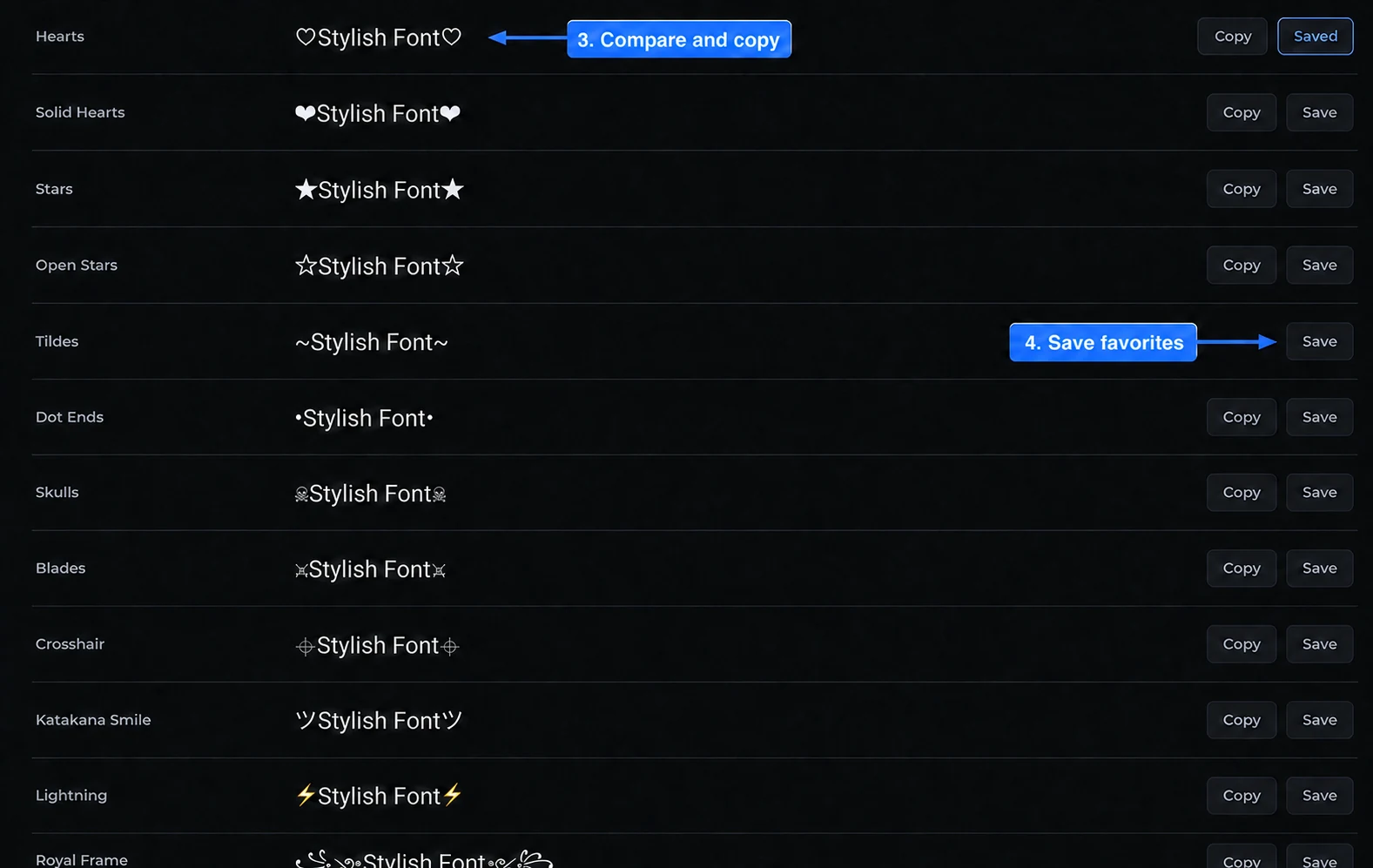
Step 3: Compare the generated results
Each result shows the style name and a live preview of your phrase. Compare the shapes, spacing,
and readability before choosing a version.
The Filter by name field can narrow the list by style name without changing your phrase. That way,
you can find a specific treatment while keeping the same input.
Step 4: Copy or save your favorite style
Select Copy to place the complete Unicode result on your clipboard. After that, paste it into the
destination field and confirm that the text renders correctly there.
You can also select Save for a style you want to revisit. Saved styles stay in the browser, while
the copied text remains ready for a bio, caption, message, or game profile.
Because platforms support different Unicode characters, a readable backup is useful. If one style shows
boxes or fails to save, return to the list and choose a simpler result.
03 How it works
How does the stylish font generator work?
Many people discover stylish text when they see a decorated bio or username and want to create a
similar look. The important difference is that this generator uses Unicode characters, so the result
stays editable after you copy and paste it.
Unicode is a shared character standard that contains far more than the alphabet on
your keyboard. It includes bold, script, and gothic versions of many letters as separate characters,
which is why styled text can travel between apps without a font download.
When you type a phrase, the Stylish Font Generator checks each supported letter against the selected
style and swaps it for its Unicode match. Anything without a match stays unchanged, so your spaces
and punctuation remain intact.
Where does it work and where does it break?
Bios, display names, captions, and chat take styled characters almost everywhere. Account handles
usually don't, because they're locked to a small character set, so a fancy version gets refused the
moment you try to save it.
Software also reads these as symbols, not letters. Search won't match them to the words they
resemble, and a screen reader won't announce them the way you'd want, so one styled line against
plain text keeps the look and dodges both problems.
Symbol frames are the reliable option when a field rejects everything else. They leave your letters
alone and only add characters around them, so a filter checking the alphabet still sees an ordinary
name in the middle.
Three rules that save you a wasted attempt
Test before you commit. Paste the exact string into the real field first, because a style that looks right here can still be refused at save.
Keep keywords plain. Styled letters aren't matched as normal ones, so anything you want found in search should stay in ordinary text.
Watch the length. Strikethrough and underline add a hidden mark to every letter, which can double the count a strict limit sees.
04 Pick a style
Which style should you pick, and where does it fit?
Every style here is one tap away, but a few of them do a lot more work than the rest. Here's how
the main families behave once they leave the preview.
Most readable
Small caps
Keeps ordinary letter shapes and renders on almost every device.
Safe workhorses
Bold and italic
Full letters and digits, and the reliable pick for a single emphasised word.
Showy, with a catch
Script, cursive, gothic
Great for a short header, but they break on consoles and older phones.
Quiet problem-solvers
Spacing and frames
Change no letters, so they save where stricter styles get refused.
The thread running through all of it is the same. The more a style rewrites your actual letters,
the better it looks and the more places refuse it. So match the style to the job: decorate a header
freely, and keep anything a person has to read, search, or type back to you closer to plain text.
05 Where it goes
Where do people use styled text most?
The tool is the same everywhere, but the destination decides which style survives. These are the
places people paste into most, and what to watch for in each.
Profiles
Bios and captions
A styled first line stands out. Keep your keywords plain underneath.
Handles
Usernames and display names
The @ handle stays plain. The display name above it usually takes styling.
In-game
Game names and clan tags
A rename can cost money, so confirm the string saves before you commit.
Chat
Group names and messages
Discord and WhatsApp names take styling. Keep a typeable core for mentions.
06 FAQ
Frequently asked questions.
Are these real fonts?
No, and that is exactly why they work. A font has to be installed on the device showing it. These styles swap your letters for characters that already exist in Unicode, so the look travels with the copy and paste and nobody has to install anything.
Why does my text show up as boxes somewhere?
The character is valid, the device just has no glyph for it. Older phones and some desktop apps ship with limited font coverage, so the rarer styles fall back to an empty box there while looking fine everywhere else.
Can I use these styles in a username?
Sometimes. Display names, bios, and chat usually accept them. Account handles are often locked to plain letters, numbers, and a couple of symbols, so test the exact string in the field before you rely on it.
Will search engines and screen readers read this text?
Not the way you would hope. To software a styled letter is a maths or symbol character, not a normal letter, so screen readers announce it strangely and search may not match it to your keyword. Keep your headings and anything important in plain text.
Does this cost anything or need an account?
No. Every style is built in your browser, nothing you type is sent to a server, and there is nothing to sign up for. The site is free and paid for by adverts.